
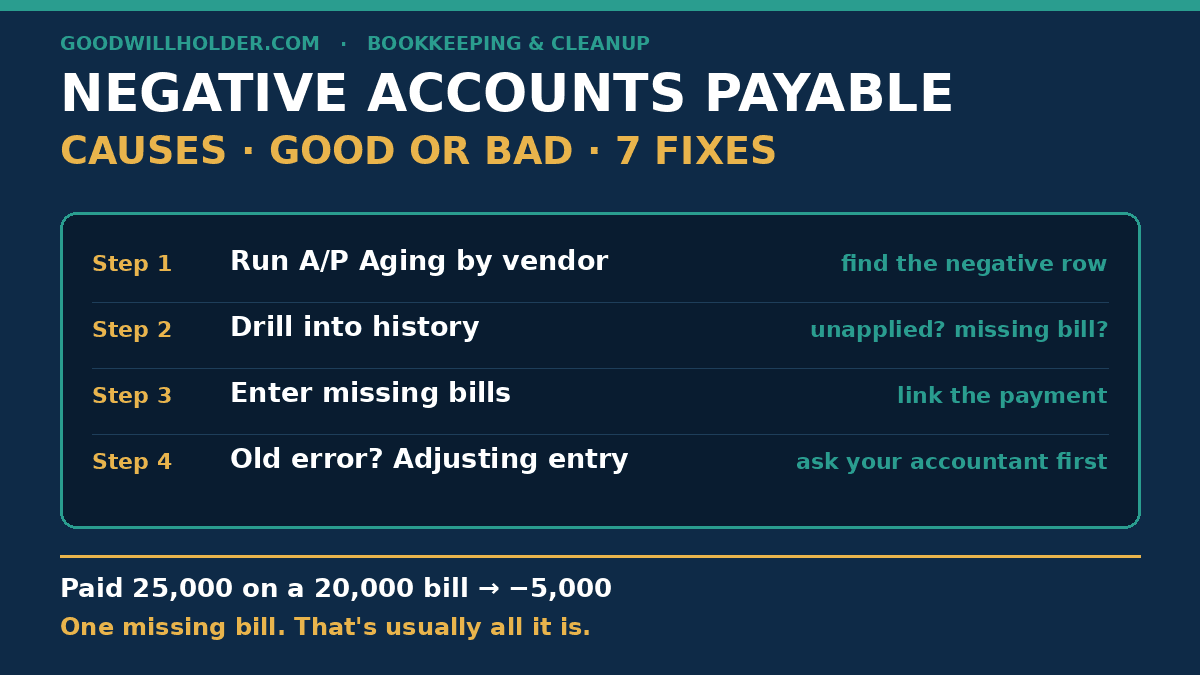
A negative accounts payable balance means your books show you owe less than zero to a vendor — usually an overpayment, a missing bill, or an unapplied credit. It turns a liability into a debit, distorts the balance sheet, and needs cleanup. Download the aging review workbook below to flag every negative vendor row, then work through the 7 fixes for QuickBooks and Xero. Most of the time, one missing bill explains the whole negative number.
Download the A/P aging review workbook
Enter each vendor and its aging buckets. Any negative total is flagged automatically so you can work through the fix checklist vendor by vendor. Use the Excel workbook as-is, or import a copy to Google Sheets and verify the formulas before relying on it.
How to Use the Aging Review Workbook
The workbook has three tabs: Start Here, Vendor Aging Review, and Fix Checklist. Yellow cells are for your entries; green cells calculate automatically. No macros are included.
- Enter each vendor on its own row with its aging buckets (Current, 31–60, 61–90, 90+, Other/unapplied). Use the same vendor names as your accounting software.
- Check Total (column G) and Status (column H). Any vendor with a negative total is flagged as Review — Negative. Do not net vendors together — review each negative row separately.
- Note the likely cause in column I (missing bill, unapplied payment, duplicate, overissued credit, out-of-sequence date, overpayment, or true deposit) after checking the vendor history.
- Record the fix in column J and mark Reviewed in column K when done. Tick off the Fix Checklist as you go.
Worked check: Flour Co. −$600 + $600 bill = $0. Masking example: Vendor A +$1,500, Vendor B −$900, Vendor C +$400 = $1,000 net, but real amount owed is $1,900.
What Is Negative Accounts Payable?
A negative accounts payable balance means your books show you owe less than zero to a vendor — usually an overpayment, a missing bill, or an unapplied credit. It turns a liability into a debit, distorts the balance sheet, and needs cleanup. Most of the time, one missing bill explains the whole negative number.
Normally, accounts payable is a credit balance: money your business owes suppliers. When that balance goes negative, your ledger claims a supplier owes you. Sometimes that is true — you paid a deposit in advance. More often it is a data problem sitting in your vendor list — often an account that should never have been set up as a payable in the first place. A tidy chart of accounts makes those mis-posts easier to spot.
What Causes Negative Accounts Payable?
Most negative accounts payable balances come from five situations:
- Overpayment. You paid more than the bill. Paying $25,000 on a $20,000 bill leaves a −$5,000 balance on that vendor.
- Unapplied prepayments or deposits. Money went to the vendor before the bill was entered, so the payment sits alone in A/P.
- Data entry errors. A bill payment categorized directly as an expense — instead of linked to an open bill — or a duplicate entry. (Our uncategorized expense guide covers a cousin of this mistake.)
- Overissued vendor credits. A credit memo or refund applied for more than the remaining bill: a $750 credit against a $480 bill leaves −$270.
- Out-of-sequence dates. A payment dated before the bill itself, which some software will not link, so both records sit unapplied.
Is Negative Accounts Payable Good or Bad?
It depends on the cause:
- Real prepayment = fine. If you genuinely paid a deposit for future goods, the negative balance behaves like a prepaid expense — an asset. It should move to Prepaid Expenses once you know what it is.
- Error = fix it now. In most cases a negative accounts payable balance is a software or bookkeeping mistake — unlinked payments, missing bills, duplicates. It understates what you owe, breaks vendor statements, and makes your balance sheet lie.
Do not read it as a cash-flow signal either. On the cash flow statement, a change in payables affects operating cash flow — paying suppliers faster reduces cash, slower increases it. But a negative vendor balance itself is a bookkeeping state, not a business strength. Lenders reading your balance sheet will ask why a supplier appears to owe you money.
How to Find the Problem
Start with an A/P Aging Summary — one that lists vendors individually. The negative row is your culprit. At Lakeview Bakery, the aging showed Flour Co. at −$600: Maya had paid a $600 deposit in January, but the $600 supply bill was never entered. One vendor, one number, one missing bill.
Watch for masking. If Vendor A shows +$1,500, Vendor B shows −$900, and Vendor C shows +$400, the total looks like $1,000 owed ($1,500 + $400 − $900 = $1,000). The real amount owed is $1,900. The negative row hides $900 of debt until you open the detail.
How to Fix Negative Accounts Payable
The fix depends on what created it. Run the aging first (in QuickBooks Online: Reports → What You Owe → A/P Aging Summary; in Xero: Reports → Aged Payables), double-click the negative row, then apply the matching fix:
- Enter the missing bill and link the payment. This is the big one. Create the bill, then apply the payment to it. At Lakeview, the −$600 became $600 − $600 = $0. In QuickBooks Online, open the payment and use Apply Credits or link it from the bill screen; in Xero, allocate the payment or credit note against the bill.
- Apply the unapplied payment or credit. If the bill already exists and the money is just floating, attach it. Most negative rows disappear here.
- Delete the duplicate. If history shows the same bill or payment twice, remove the extra — but check for a cleared/reconciled mark first.
- Reclass a true deposit. If it really is money paid in advance for future goods, move it to Prepaid Expenses — it is an asset, not a negative liability.
- Fix out-of-sequence dates. A payment dated before its bill often cannot link. Correct the dates so the payment applies properly.
- Recover the overpayment. Paying $25,000 on a $20,000 bill leaves −$5,000. Ask the vendor for a refund or a credit on the next purchase, then record what actually happens.
- Adjusting entry — last resort. If the balance is old, unrecoverable, or truly untraceable, an adjusting journal entry can clear it to the right expense or other income account — with your accountant’s sign-off. Do not journal-entry your way past a missing bill; find the paper first.
One exception deserves a warning: writing off payables is only legitimate when a liability is genuinely discharged, cancelled, or expired. If the vendor still expects payment, the negative number is pointing at paperwork — not at debt relief.
How to Prevent It
Good A/P habits keep negative accounts payable off your balance sheet:
- Bill first, pay second. Enter the bill before recording the payment, even for deposits — a deposit should sit in Prepaid Expenses or against a real bill.
- Never pay direct to expense when a bill exists. Use Pay Bills (QuickBooks) or Bill + Allocate (Xero) so the payment always has something to land against.
- One owner for A/P. Two people entering bills and payments is how duplicates and double-payments happen.
- Apply credits within the week. Vendor credits and refunds should be attached to bills quickly, never left floating.
- Check dates. Payments should never be dated before their bills.
- Review the aging monthly. Add “A/P Aging has no negatives” to your month-end close checklist.
Most of these habits come down to knowing what you actually owe, to whom, and under what terms. A maintained supplier tracker gives you that before the balance ever flips negative.
Quick Checklist
- Run A/P Aging Summary by vendor — circle every negative row.
- Open each one: unapplied payment, missing bill, or duplicate?
- Enter the missing bill and link the payment or credit — the balance zeroes out.
- True deposit? Reclass it to Prepaid Expenses.
- Old untraceable error? Adjusting entry with your accountant’s approval.
- Add a monthly aging review so it never builds up again.
This balance is a symptom, not a mystery. One aging report, ten minutes of history-reading, and usually one missing bill — that is the whole investigation. Fix the cause, not just the number, and your vendors, your reports, and your tax preparer all see the same truth. If the vendor list is already a mess, our bookkeeping cleanup service does exactly this work.
Want the official references? See this QuickBooks community guide to fixing negative A/P and the IRS recordkeeping guidance that clean books support.
Frequently Asked Questions
What does a negative accounts payable mean?
It means the ledger shows you owe less than zero to that vendor — the vendor appears to owe you. Usually it is a missing bill, an unapplied payment, or an overpayment, not a real asset. Run the aging by vendor to find the row.
Can accounts payable be negative?
Yes, as a bookkeeping state — for example when you paid a true deposit for future goods. Review it, and if it is a real prepayment, move it to Prepaid Expenses. If it is an error, fix the cause.
Why is accounts payable negative on the balance sheet?
Because payments or credits were recorded without a matching bill, or a bill is missing, duplicated, or dated after its payment. The aging summary by vendor shows which vendor is negative and why.