
What Are Duplicate Transactions?
Duplicate transactions in bookkeeping happen when the same payment, invoice, or expense gets recorded twice in your accounting system. They overstate expenses or income, break bank reconciliation, and distort every profit report you rely on. You find them by comparing dates, amounts, and payees; you fix them by removing the extra entry carefully.
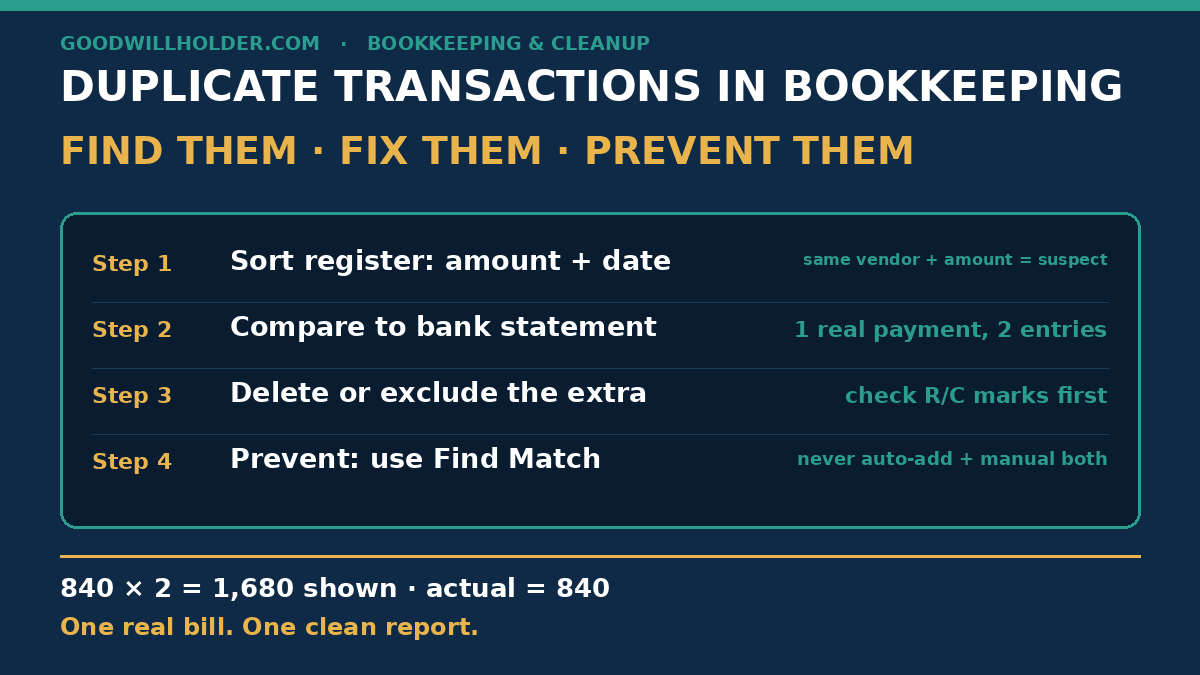
At Lakeview Bakery, Maya paid one $840 flour bill in March. The bill was entered by hand on Monday and accepted again from the bank feed on Wednesday. The expenses report showed $1,680 instead of $840 — an $840 overstatement from one real bill. This is the most common form of duplicate transactions in bookkeeping: not fraud, just two doors into the same books.
Why Duplicate Transactions Happen
Most duplicate transactions in bookkeeping come from four situations:
- Manual entry plus bank feed. Your team records a bill by hand, then clicks Add when the same item imports from the bank.
- Multiple users. Two people — owner, staff, or accountant — record the same activity without seeing each other’s work.
- Bank reconnections. Unlinking and relinking a bank feed can re-import weeks of history you already posted.
- Two data sources. A live feed plus a monthly CSV or PDF statement for the same credit card or payment processor.
How to Find Duplicate Transactions
Run three checks, in this order:
- Sort the register by amount, then date. Same vendor, same amount, same week = suspect until proven otherwise. Maya’s $840 showed up twice, three days apart. In QuickBooks Online, the Transaction List by Vendor and Expenses by Vendor Summary reports surface these doubles fastest; in Xero, the Account Transactions report sorted by amount does the same job.
- Compare to the bank statement. One real payment means one entry. If the bank shows $840 once and your books show $1,680, you have found the problem.
- Check the reconciliation difference. Before the fix, Lakeview’s bank balance was $9,200 and the books showed $8,360 — a gap of $840. After removing the duplicate expense, $8,360 + $840 = $9,200 and the account balances.
A quick report filter helps at scale: export the transaction list, and highlight rows where the amount appears more than once. Two $125 utility payments look harmless until you notice 125 × 2 = 250 is shown but only $125 actually left the bank. That $125 difference is exactly the kind of gap that makes month-end reconciliation stall.
How to Fix Them in QuickBooks Online
The fix depends on where the duplicate sits:
- Still in For Review? Select the extra entry and click Exclude. It never posts to your books.
- Already added? Open Chart of Accounts → View Register for that account → find the extra entry → Delete. If it is still uncategorized, use Undo first so it returns to the bank feed queue.
- One real payment, two records? Use Find Match instead of Add. Match links the bank feed item to the entry you already made — nothing doubles.
- Marked cleared (C) or reconciled (R)? Stop. Deleting reconciled entries changes past reconciliation balances. Confirm with your accountant before touching these.
Fixing Duplicates in Xero and in Spreadsheets
The same rules for duplicate transactions in bookkeeping apply in Xero: remove the statement line you manually imported, or un-reconcile and delete the duplicate invoice or bill. In a spreadsheet, highlight the amount column and use Remove Duplicates, or add a helper column with COUNTIF — any amount counting more than once deserves a second look. If your books live in Google Sheets, our bank reconciliation in Google Sheets guide shows the matching step that prevents this in the first place.
How to Handle a Duplicate Payment
A duplicate payment is different from a duplicate entry — money actually left the bank twice. That is a vendor issue, not just a bookkeeping one: contact the vendor, request a refund or a credit on the next bill, and record the refund when it arrives. Never delete the second payment from the books if the bank really paid it twice; the books must show what the bank did.
How to Prevent Duplicate Transactions
Good workflow is the only permanent cure for duplicate transactions in bookkeeping. Five habits do most of the work:
- Turn off auto-add rules for accounts where you enter transactions manually. Let items wait in For Review.
- Choose one workflow. Either enter first and match later, or build everything from the feed — never both.
- Link each bank account once. Reconnecting feeds re-imports history; check connections before you fix “missing” months.
- One sync schedule. If you use an app that pushes data into your books, run one clean sync instead of overlapping manual uploads.
- Reconcile every month. A monthly bank reconciliation catches duplicates within weeks, not years. Our month-end close checklist includes this step.
The 10-Minute Friday Routine
Fixing duplicates takes hours; preventing them takes minutes. Every Friday, Maya spends ten minutes on three tasks: she sorts the week’s register by amount, eyeballs any vendor that appears twice, and checks that the bank feed queue is empty. Ten minutes of scanning for duplicate transactions in bookkeeping each week means nothing ever survives to month-end. Add it to your calendar next to your weekly review — the habit costs less than one corrected mistake.
Quick Checklist
- Sort register by amount and date — look for same vendor + same amount.
- Compare each suspect to the bank statement: one payment, one entry.
- Exclude (For Review) or Delete (register) the extra — but ask before touching R/C entries.
- Use Find Match instead of Add whenever the entry already exists.
- If cash really left twice, treat it as a duplicate payment and chase the refund.
- Reconcile monthly so duplicates never survive a close.
Duplicate transactions in bookkeeping are small mistakes with expensive consequences — inflated expenses, wrong tax numbers, and reconciliation gaps that take hours to trace. Find them early, fix them carefully, and set your workflow so the same entry can never enter your books twice. If the mess is already deep, our bookkeeping cleanup service does exactly this work.
Recordkeeping habits matter at tax time too — see the IRS recordkeeping guidance and the Zoho Books duplicate transactions FAQ for official references.