
You do not need a bank sync, an add-on, or accounting software to reconcile a bank account. You need Google Sheets, two lists of transactions, and about fifteen minutes a month. That is the manual method — and done properly, it catches exactly the same errors any paid tool would.
This guide builds the whole thing step by step: three tabs, six steps, five formulas, and a worked month that ends at a difference of zero. If you can download a CSV and paste it, you can do this.
Key takeaways
- Bank reconciliation in Google Sheets is two lists matched line by line, plus one summary block that must land on zero.
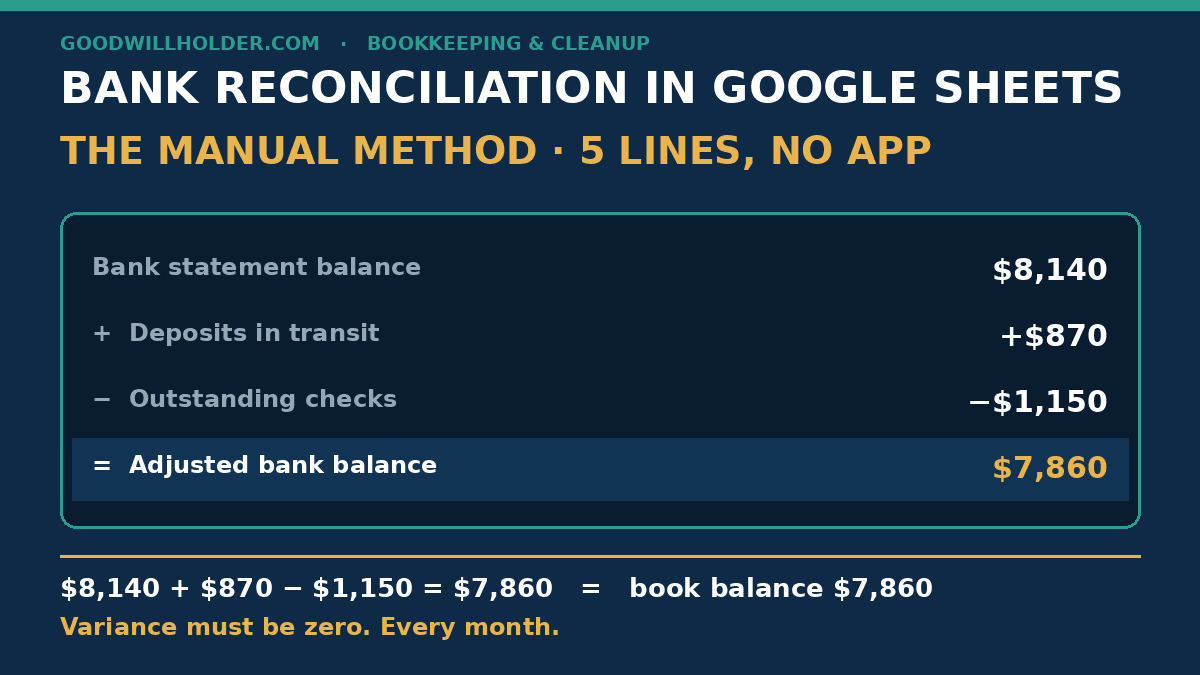
- The direction matters: bank statement + deposits in transit − outstanding checks = adjusted bank balance.
- Only four kinds of gaps exist: deposits in transit, outstanding payments, bank fees and interest, and plain errors.
- Worked example: $8,140 + $870 − $1,150 = $7,860, which equals the book balance exactly.
- Lock the month with Protect range when the difference is zero — that is your audit trail.
What Is Bank Reconciliation in Google Sheets?
Bank reconciliation in Google Sheets is comparing your cash-book rows against the bank statement line by line, adjusting both sides for timing items like deposits in transit and outstanding checks, and proving the two balances agree. When the difference is zero, the month is reconciled — no software required.
What the Manual Method Uses
Three tabs in one workbook, and nothing else:
- Tab 1 — Bank statement: Date, Description, Withdrawals, Deposits, Running balance.
- Tab 2 — Cash book: Date, Description, Money out, Money in, Book balance.
- Tab 3 — Summary: the five-line reconciliation block, which you build in Step 5.
Two rules before any matching happens. First, both lists must cover the same date range — same first day, same last day. Second, both date columns must use one format: YYYY-MM-DD. Select the column, then Format → Number → Date, and type dates the same way every time. Half of all “mismatch” problems are really date-format problems.
How to Do Bank Reconciliation in Google Sheets: 6 Steps
Step 1: Build the three tabs
Create the tabs and columns above. Name the tabs exactly — Statement, Cash book, Summary — because your formulas will point at them by name. On the statement tab, add one more column: Cleared. In Google Sheets you can make it a real checkbox: Insert → Checkbox.
Step 2: Load both lists for the same period
Download the month’s statement as CSV from your bank. On the Statement tab use File → Import → Insert new sheet, or just paste. Load your cash-book rows the same way. Fix any date cells that pasted as text, and check one opening figure against last month’s closing figure before you go further.
Step 3: Mark every line that cleared
Work down the bank statement. For each line, find its twin in the cash book — same date, same amount, same payee — and tick its Cleared checkbox. For a fast pass on a long month, add a helper column on the statement tab:
=IFERROR(MATCH(C2, 'Cash book'!C:C, 0), "NOT FOUND")
where C is your amount column. Rows that return a row number have a twin; rows that return NOT FOUND are your investigation list. Highlight them: Format → Conditional formatting, custom formula =F2=FALSE on the checkbox column, fill red. Amounts alone can false-match, so confirm the payee and date before you tick.
Step 4: Find the four kinds of reconciling items
Every gap between the two lists is one of only four things:
- Deposits in transit — money you recorded and the bank has not shown yet. Normal if the deposit went in near month end.
- Outstanding payments — checks or transfers you recorded that have not cleared. Normal; list them by date so stale ones stand out.
- Bank fees and interest — charges or credits the bank made that are missing from your cash book. These are not timing items; enter them.
- Errors — a mistyped amount, a wrong sign, a line entered twice. Sort both lists by amount, largest first, and the big typos jump out.
Step 5: Build the summary block and prove zero
On the Summary tab, five lines — this is the whole reconciliation:
- Bank statement balance (from the statement)
- + Deposits in transit
- − Outstanding payments
- = Adjusted bank balance
- Book balance, and the variance: adjusted bank − book
The variance cell must show 0. If it does not, you are not reconciled — the number in that cell is the exact size of what you have not found yet. Keep going back to Step 4. Never plug a balancing entry to make it zero; that hides the error one layer deeper, where it costs double to find next month.
Step 6: Post the adjusting entries and lock the month
Anything the bank did that your books never recorded — fees, interest, a bounced deposit — goes into the cash book now. Then lock the month: select the reconciled rows on both tabs, right-click → Protect range, set permissions to only you. Locked months plus a zero variance is an audit trail your accountant will actually thank you for.
Example: One Month, Two Balances, Zero Difference
Lakeview Bakery, May 2026 — a composite of real sheets. The bank statement ends at $8,140. The cash book says $7,860. A $280 gap, and the instinct is to panic. There is nothing to panic about: there are two timing items.
One deposit of $870 went in on Friday afternoon; the bank posts it Monday. Three checks totaling $1,150 are written and recorded but not yet cashed. Adjust the bank side:
$8,140 + $870 − $1,150 = $7,860.
That is the book balance exactly. The variance cell shows $0, and the month is closed. The $280 “gap” was never missing money — it was $1,150 of un-cashed checks minus $870 of deposit timing. This is what a normal, healthy reconciliation looks like.
The 5 Formulas You Actually Need
Assuming amount columns C (money out) and D (money in), the Cleared checkbox in F, and a MATCH helper in G:
| Task | Formula |
|---|---|
| Total money in this month | =SUM(D2:D100) |
| Total money out this month | =SUM(C2:C100) |
| Count uncleared lines | =COUNTIF(F2:F100, FALSE) |
| Sum of unmatched amounts | =SUMIF(G2:G100, "NOT FOUND", C2:C100) |
| Duplicate-line flag | =COUNTIFS(A2:A100, A2, B2:B100, B2)>1 |
That is the entire toolkit. Everything else in a reconciliation is judgment — and judgment is the part no add-on can do for you.
Frequently Asked Questions
How do I do bank reconciliation manually?
Keep two lists — the bank statement and your cash book — and match them line by line. Then adjust the bank side for deposits in transit and outstanding payments. When the adjusted bank balance equals your book balance, the account is reconciled. Lock the month and start the next one.
What are the steps of bank reconciliation?
Gather the statement, load both lists for the same period, mark every cleared line, list the reconciling items — deposits in transit, outstanding payments, bank fees, errors — adjust the balances, and prove the difference is zero. Then post the adjusting entries and lock the month.
How often should I reconcile my bank account?
Once a month, in the week the statement closes — more often if transaction volume is high. A monthly habit keeps the work to fifteen minutes. Skipping three months turns the same job into an afternoon of archaeology, and stale outstanding checks get much harder to explain.
What is the difference between a bank statement and a bank reconciliation?
A bank statement is the bank’s own record of your account for a period. A bank reconciliation is the proof that your records agree with it — the line-by-line matching, the timing adjustments, and a final difference of zero. One is a document; the other is a control.
When It Makes More Sense to Hand It Off
The manual method is honest work, but it assumes someone has the hour a month to give it. I build money-tracking spreadsheet systems for small service businesses in the US and UK — and I clean up the files behind them when the months have piled up. One sheet, fixed scope, fixed price. If that would help, get in touch.