
Chart of Accounts: 7 Simple Steps to Build It Right
A chart of accounts for small business is the organized list of accounts used to record transactions and prepare financial reports. A clear structure supports consistent bookkeeping, but it does not automatically categorize transactions—and there is no one-size-fits-all chart.
This guide explains the five main account groups, shows an illustrative 30-account example, and walks through seven practical setup steps. Adapt the sample to your entity, industry, accounting method, software, and local rules before using it.
Get the free 30-account sample
Download the CSVOpen the Google Sheets sample
The Sheet is view-only for link visitors. To customize it, choose File > Make a copy. Both files are illustrative examples, not accounting or tax advice; adapt them to your business and jurisdiction.
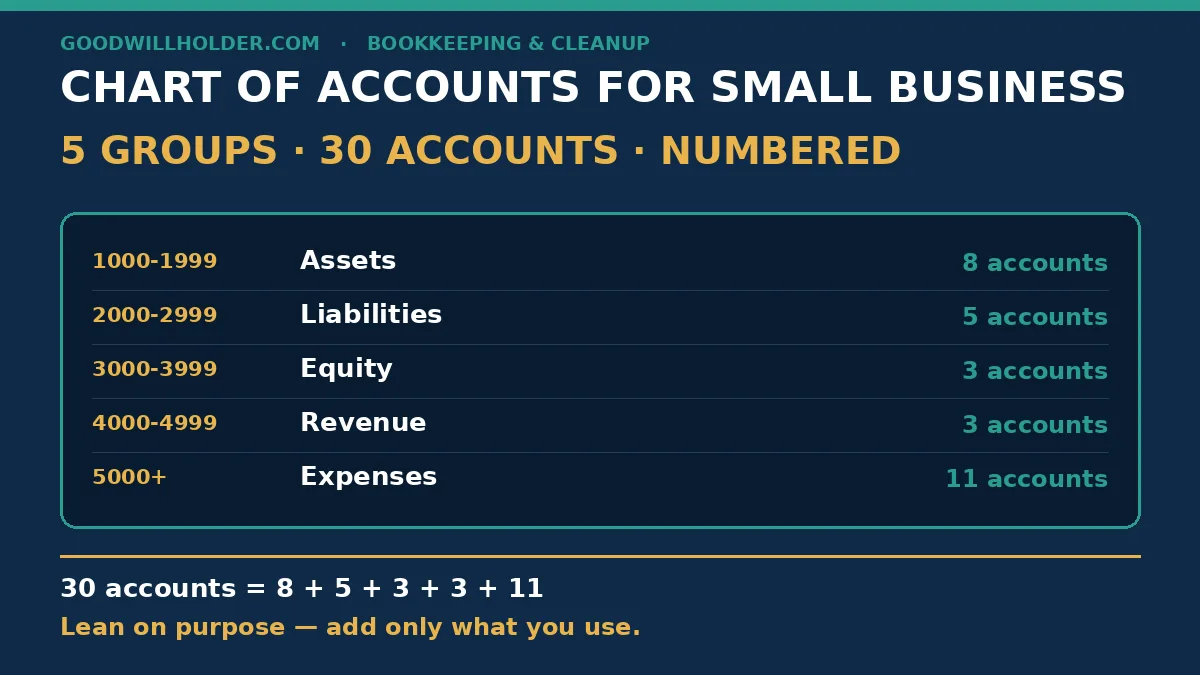
The five main account groups, with example numbering. Account numbers are a convention, not a universal requirement.What Is a Chart of Accounts for Small Business?
A chart of accounts (COA) is the numbered list of accounts a business uses in its bookkeeping system. Each account is assigned a name and type—such as an asset, liability, income, or expense—so transactions can be classified consistently and reports can be organized.
A well-designed chart can make it easier to review cash, amounts owed, sales, and spending. A useful chart of accounts for small business is not necessarily the longest one; it is the list that supports clear, consistent records and useful reports. It does not replace transaction review, reconciliations, or bookkeeping rules. The right account list depends on the business, its legal structure, accounting basis, reporting needs, software, and jurisdiction.
The Five Main Account Groups
| Account group | What it generally tracks | Examples |
|---|---|---|
| Assets | Resources the business owns or controls | Checking, receivables, inventory, equipment |
| Liabilities | Amounts the business owes | Supplier bills, credit cards, tax payable, loans |
| Equity | The owners’ residual interest, subject to the entity’s structure | Contributions, draws or distributions, retained earnings |
| Income / revenue | Amounts earned from business activities | Product sales, service revenue |
| Expenses | Costs incurred to operate and earn revenue | Cost of goods sold, rent, insurance, software |
Cost of goods sold (also called cost of sales) may appear as its own line or category in reports and software. In this five-group overview, it belongs with the business’s expense accounts; follow the accounting method and software setup that apply to your business.
The liabilities group is only as reliable as the records behind it. Keeping supplier terms, approval status and purchase orders in one supplier tracker means the A/P balance can be checked against something concrete at review time.
Equity account names depend on the legal structure of the business. For a related explanation, see opening balance equity.
Chart of Accounts for Small Business: Suggested Number Ranges
Some businesses use number ranges to keep accounts in a predictable order. These bands are one way to organize a chart of accounts for small business; they are an example, not a legal or accounting standard. Your software or accountant may use a different structure.
- 1000–1999: Assets — for example, 1010 Checking and 1200 Accounts Receivable.
- 2000–2999: Liabilities — for example, 2010 Accounts Payable and 2400 Business Loan.
- 3000–3999: Equity — for example, 3010 Owner Contributions.
- 4000–4999: Income — for example, 4010 Sales and 4020 Services.
- 5000 and above: Expenses — some businesses place direct costs or cost of goods sold in the 5000s and operating expenses in the 6000s.
Leave gaps between numbers—for example, 1010, 1020, and 1030—if your system supports it. Gaps can make it easier to insert a new account later without renumbering every account. If you already use accounting software, check its account-numbering and import conventions first.
How to Build Your Chart of Accounts in 7 Steps
- Review the chart in your accounting software. If the software already has a suitable default chart, start by reviewing and adapting it rather than creating a duplicate list.
- List your real business activities. Consider how you receive money, pay suppliers, deliver products or services, borrow, and report results. Add accounts only when they help classify transactions or produce useful reports.
- Choose a numbering convention. Use consistent number bands if they help you sort and maintain the list. Numbers such as 1010, 1020, and 1030 are one possible convention—not a requirement.
- Use clear, consistent names. “Bank Fees” is easier to understand than an unexplained abbreviation. Use names that make sense to the people who will code and review transactions.
- Start with the detail you need. Treat 30 accounts as an example, not a target. Add detail when it improves reporting; avoid duplicate accounts and accounts that nobody uses.
- Check reporting and tax needs. Bookkeeping accounts may be more detailed than tax-form lines, and classifications differ by country and entity. Confirm how your records should map to local reporting requirements with a qualified adviser.
- Test and review the setup. Check how common transactions appear in your reports, reconcile bank and card accounts, and review the chart periodically. Before deleting or reusing an old number, consider the transaction history and your software’s rules.
A chart of accounts is not finished the day it is built. Accounts drift, get duplicated, and quietly stop matching how the business actually works — which is why a fixed month end close routine is the practical way to keep the structure honest.
The chart is the list of accounts a business posts to; the general ledger is where those postings accumulate into balances.
30-Account Small Business Example: Lakeview Bakery
This chart of accounts for small business example uses an illustrative bakery-style list. It is not a recommended account list for every business. Some rows—such as inventory, payroll liabilities, sales tax or VAT, and owner-equity accounts—may not apply to your business. Account names and normal balances should be reviewed against your software, entity, accounting method, and local requirements.
Illustrative sample chart of accounts: 30 accounts
Number Account name Group Typical normal balance 1010 Checking Asset Debit 1020 Savings Asset Debit 1030 Petty Cash Asset Debit 1200 Accounts Receivable Asset Debit 1400 Inventory Asset Debit 1450 Prepaid Expenses Asset Debit 1500 Equipment Asset Debit 1510 Accumulated Depreciation Contra-asset Credit 2010 Accounts Payable Liability Credit 2100 Credit Card Payable Liability Credit 2200 Sales Tax / VAT Payable Liability Credit 2300 Payroll Liabilities Liability Credit 2400 Business Loan Liability Credit 3010 Owner Contributions Equity Credit 3020 Owner Draws / Distributions Contra-equity Debit 3030 Retained Earnings Equity Credit 4010 Sales Income Credit 4020 Services Income Credit 4900 Other Income Income Credit 5010 Ingredients Expense / direct product cost Debit 5100 Packaging Expense / direct product cost Debit 5200 Wages Expense Debit 5300 Rent Expense Debit 5400 Utilities Expense Debit 5500 Insurance Expense Debit 5600 Advertising Expense Debit 5700 Software Expense Debit 5800 Bank Fees Expense Debit 5900 Cleaning Expense Debit 5990 Miscellaneous Expense Debit Count: 8 asset accounts + 5 liability accounts + 3 equity accounts + 3 income accounts + 11 expense accounts = 30 accounts. A “normal balance” is the usual debit or credit side for that account type; individual transactions and contra accounts can differ.
A Simple Journal Entry Example
Assume Lakeview Bakery receives $420 in cash for a sale, with no sales tax, card-processing fee, or credit-sale adjustment included in the example:
- Debit Checking (1010): $420
- Credit Sales (4010): $420
The debit and credit are equal, so the entry balances. If tax is collected or a processor deducts a fee, the entry may need additional accounts. Follow the business’s accounting method and applicable local rules.
One number worth watching on the liabilities side is a balance that goes below zero. A negative accounts payable balance is usually a posting or timing issue rather than free money, and it is easier to fix in the month it appears.
Common Chart of Accounts Mistakes
- Creating too many accounts too early: add detail when it answers a reporting question or meets a real requirement.
- Using unclear names: choose account names that the people maintaining the books can recognize consistently.
- Mixing personal and business activity: use accounts and records appropriate to the legal entity; ask an adviser how owner transactions should be treated.
- Putting tax collected into sales revenue: tax treatment varies by jurisdiction; where applicable, track amounts collected as required rather than assuming they are business revenue.
- Relying on a catch-all account: if transactions repeatedly land in uncategorized expense, check whether the chart, bank rules, or bookkeeping process needs adjustment. See how uncategorized expenses can arise.
- Forgetting the cash you cannot see: a petty cash float needs its own account and a record of what went in and out. A simple petty cash log keeps that balance from drifting silently.
- Deleting or renumbering accounts without checking history: review existing transactions, reports, and software rules before changing accounts. Keep a record of material changes.
Frequently Asked Questions
What are the five basic account groups?
The five main groups are assets, liabilities, equity, income (or revenue), and expenses. Cost of goods sold may be shown separately in reports, but is commonly treated as an expense category in this overview. Account labels can vary by software and accounting framework.
How many accounts should a small business have?
There is no universal ideal number. The 30 accounts in this example are a starting point for discussion, not a target or requirement. Use the accounts needed to record transactions clearly and produce the reports the business requires.
Where can I download a chart of accounts for small business?
You can download the 30-account CSV sample or view the Google Sheets sample. The shared Sheet is view-only; use File > Make a copy before customizing. Review the Read Me tab and remove or change any account that does not fit your business.
Can I use this sample in any accounting software?
Use it as a reference, not as a guaranteed import file. Accounting programs may use different account types, required fields, numbering conventions, and import formats. If you use QuickBooks or Xero, check the product’s current instructions, back up existing data, and review the account mapping before importing or changing a chart.
Do I have to use these account numbers?
No. The number ranges in this example are organizational suggestions. Your accounting software, reporting requirements, or adviser may recommend another structure. Keep numbering consistent and avoid changing accounts with transaction history without checking the consequences.
Should I include sales tax, VAT, payroll, or inventory accounts?
Only use accounts that fit the business and its obligations. Tax, payroll, and inventory treatment depend on the jurisdiction, entity, accounting method, and business activity. Confirm local requirements with a qualified accounting or tax professional.
Key Takeaways
- A chart of accounts for small business organizes the accounts used to record transactions and prepare reports.
- The five main groups are assets, liabilities, equity, income, and expenses.
- Number ranges such as 1000s for assets and 2000s for liabilities are optional conventions, not universal rules.
- The 30-account Lakeview Bakery example is illustrative; adapt or remove accounts to suit the business.
- Review the chart when business activities, reporting needs, or software change. For a year-end review, see the year-end close checklist.
If you need help organizing bookkeeping records, see the bookkeeping cleanup page and review its stated scope to decide whether it fits your needs.
This article is for general educational purposes and is not accounting, tax, or legal advice. Account names, reporting rules, and tax treatment vary by business and jurisdiction. Consult a qualified professional about your situation.