
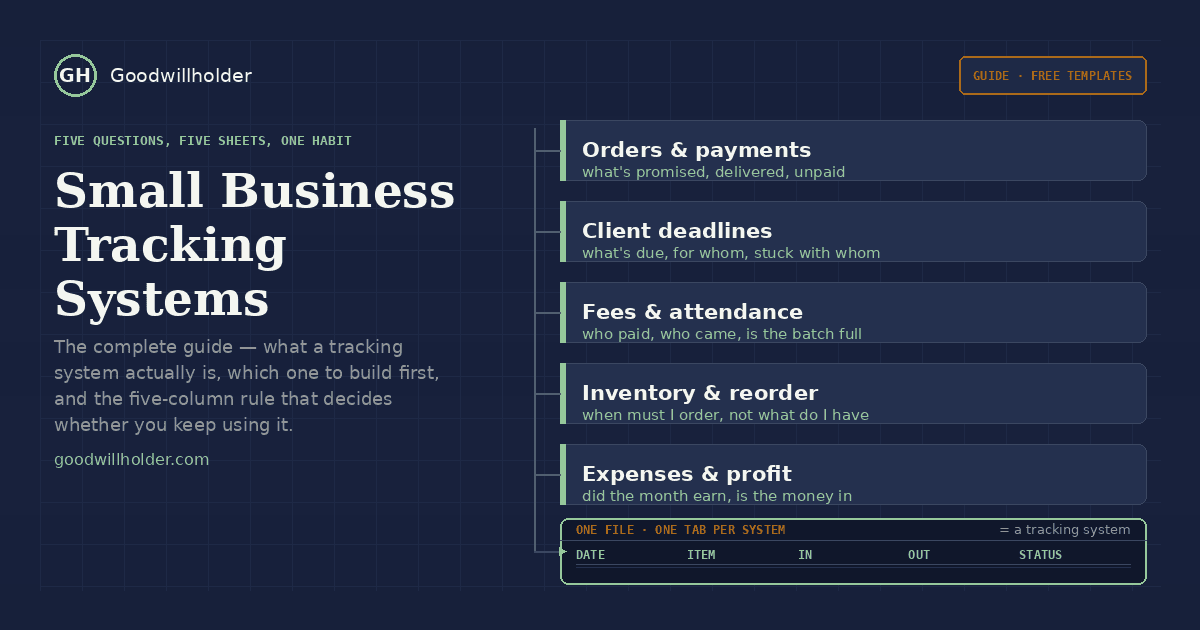
Small business tracking systems are not software, and believing that they are is why most of them fail. A small business rarely dies because it was missing an app. It dies because nobody knew where the last unpaid bill was, which customer was waiting on a delivery, or how much was actually left after expenses. Somebody always knows something — which is exactly how a promise gets broken three days later, when that person is on leave.
A tracking system is the fix, and it is smaller than it sounds: a named answer to a specific question, usually one Google Sheet, occasionally two. This guide is the map of the five that matter, which one you need first, and why most people's first attempt turns into a file nobody opens by April.
What small business tracking systems actually mean
Small business tracking systems are deliberately boring. No dashboard, no automation subscription, no process document. A working one has three components and nothing else:
- One place where each event gets written — an order, a payment, a missed deadline, a stock movement, an expense
- Fixed columns, so entries stay comparable week after week and you can sort them
- A weekly ritual of looking at it
That third item is the whole difference between a system and a graveyard file. I have opened plenty of businesses where the first two existed in a notebook nobody had read since Diwali. If a paper notebook genuinely does all three, it works; a spreadsheet just makes filtering, totals and sharing possible. The tool is not the system.
Start with one, not five
Here is the fastest way to pick. Answer one question honestly:
“Which promise did I recently break to a customer?”
- Missed a delivery or a filing date → client deadlines
- Nobody could say whether an order was shipped → orders & payments
- Money was owed and only remembered at month end → the pending dues half of the same system
- A best-seller ran out and the supplier took a week → inventory & reorder
- “Where did the month go?” → expenses & profit
Start with the one system for that broken promise. Not all five at once — building five sheets in a weekend is how people abandon spreadsheets, because by week three there are five places to update and no time to update any of them. The most durable small business tracking systems are built one at a time: one system, honest for two months, then a second. That is the sequence that survives.
One thing that isn’t in this map: leads, customers and relationships. Enquiries, follow-up promises and client history are a different job, and they get worse when you stuff them into an operations sheet — that belongs in our free lead tracker and the Google Sheets CRM guides. Everything below handles operations and money, not relationships.
The five systems
1. Orders & payments
What was promised, what was delivered, what is still unpaid. It answers the two questions customers actually ask — where is my order and have I paid you already — and the one owners avoid: who owes me how much, since when.
Minimum columns: customer, order date, order value, promised delivery date, delivery status, payment status, pending amount. Two rules make it work: one row per order (never one row per item — that goes in a second tab), and statuses as dropdowns rather than typed words.
Start with the sales order tracker for open work; add the pending dues sheet when collections are the problem, and an invoice log as soon as you issue numbered invoices.
2. Client deadlines
For service businesses — CA and accounting firms, design studios, agencies, consultants. Which client, which deliverable, which date, who owns it, and who it is stuck with.
The column everyone forgets is the one that saves them: waiting on client. A missed date and a date that slipped because the client never sent the file are completely different problems, but in a sheet with only a status column they look identical. Separating them means a slipped date is documented instead of argued, and you stop absorbing blame for work that left your desk weeks ago.
Files: client deadline tracker, compliance calendar, work status tracker.
3. Fees & attendance
Coaching classes, music schools, tuition centres, gyms: student, batch, month, fee due, fee received, attendance. The trap is that these three things are usually kept in three places — strength in a register, fees in a diary, attendance on a wall sheet — so a decision that needs all three (should I open a second batch?) gets made from memory.
The structural decision that matters: one row per student per month, not one row per student with twelve month-columns. Five hundred rows looks frightening and filters beautifully; a wide sheet looks tidy and is useless in February.
Files: student fee tracker, attendance sheet, batch tracker.
4. Inventory & reorder
Quantities in, quantities out, what is on the shelf, and — the part almost every shop misses — the line below which you should have already ordered. Most small shops count stock; very few ever set a reorder point, which is why the count feels productive and the empty shelf still arrives.
The reorder line isn’t a number you feel your way to. It is your average daily sale, times how long the supplier genuinely takes to deliver, plus a little safety. Once that exists, the sheet can flag the item — and a flag on the day is worth fifty times a number you notice after the customer asks.
Files: inventory tracker with reorder alerts, stock count sheet, purchase & supplier tracker.
5. Expenses & profit
Income minus expenses, month by month, plus the number a standard profit-and-loss template leaves out: the money that actually landed in the account. Those two diverge in every real business, and knowing the gap between them — receivables sitting unpaid, cash tied up in stock — is more useful than either figure alone.
For sole proprietors there is a trap before any of that: personal spending living inside business expenses. It makes profit look smaller than it is, so you under-price the next job. The owner’s draws go below the profit line, never in the rent row.
Files: monthly P&L, petty cash log, sole-proprietor expense tracker.
All five of these small business tracking systems share one structure: one row per event, fixed columns, a weekly review. Learn that shape once and the sixth system you ever need takes an afternoon, not a course.
Small business tracking systems, mapped on one screen
| System | Question it answers | Weekly time | Start with |
|---|---|---|---|
| Orders & payments | What’s promised, delivered, unpaid? | 10 min | Sales order tracker |
| Client deadlines | What’s due, for whom, stuck with whom? | 9 min | Deadline tracker |
| Fees & attendance | Who paid, who came, is the batch full? | 10 min | Fee tracker |
| Inventory & reorder | When must I order, not what do I have? | 5 min + count | Reorder tracker |
| Expenses & profit | Did the month earn, and is the money in? | 15 min | Monthly P&L |
Thirty to forty-five minutes a week, in total — spread across five systems, each one running in a single ten-minute slot. If a system costs more than that, it is over-built and will be abandoned; simplifying it is the fix, not pushing through.
Five rules from fixing other people’s files
- One row per event, one tab per function. No merged cells, no “misc” column, and never two different jobs in one tab.
- Dates in date format. Typing
5/9is fine; typing “last week” kills every filter you will ever try, quietly and permanently. - Status is a dropdown of three or four fixed values. Free text is how a tracker stops being sortable in week three.
- Colour only for late. Everything coloured is nothing coloured — if four columns have fills, your eye reads none of them.
- The file belongs to the business. It lives in the business’s Drive — a shared drive if there is more than one of you — and the owner is the business, not one person’s login. A system only one person can open is not a system, it is a memory with a spreadsheet attached.
The 90-day test
After three months, ask four questions. Not “did I fill it in”.
- Can a customer give you an order number and reach the row in under a minute?
- Is last month’s billed-versus-received total one filter, not an afternoon?
- Has the sheet survived one genuinely busy week without being back-filled later?
- Would the answers be the same if you handed the file to someone else and asked them?
If two of those fail, what you have is a memory aid, not a system. And the fix is almost never a new column — it is a stricter dropdown, a shorter list of valid values, a simpler rule. Adding columns feels like improvement for about three weeks, then the effort of keeping nine extra fields current exceeds the value of knowing, and the file drifts back into being a notebook. One dropdown that everyone actually uses beats a perfect schema nobody fills. That is the entire test for small business tracking systems: not completeness, whether anyone can still find things in it after you stop thinking about it.
Free templates
Every system above has a free Google Sheets template in its own article — same columns, same formulas, nothing locked, no signup. Each one opens with a “copy to your Drive” link; if you have never done that, Google's own steps for copying a shared file take a minute. For the quickest start: the sales order tracker and the pending dues sheet. Two files, about fifteen minutes to make them yours, and they cover the promise most small businesses break first.
Want it built around your business?
If you would rather not babysit formulas and dropdowns, I build exactly these systems for small businesses — on your client names, your item list, your categories, with your old notebook or bill folder imported. Usually within 48 hours, and a free sample on part of your data first, so you can see it working on your own numbers before deciding anything.
Get in touch and tell me which promise you broke last. I will tell you honestly whether a sheet is enough — sometimes it is, and I would rather send you off with a template than take money for something you can build yourself in an afternoon.
Written by Hifzur Rahman. I build tracking systems for small businesses; every template on this site is free and needs no signup.