
If you want to know how to clean up undeposited funds in QuickBooks, you are almost certainly looking at the same thing every bookkeeper sees: an account called Undeposited Funds sitting on the balance sheet with a number in it that nobody can explain. Sometimes it is four hundred dollars. Sometimes it is forty thousand. Either way, the money is not missing. It is stuck in a waiting room.
This guide explains what the account actually does, why the balance builds up, and the exact order to work through it. Learning how to clean up undeposited funds in QuickBooks properly matters because the wrong order breaks a reconciliation you have already finished.
Table of Contents
ToggleWhat the undeposited funds account really is
Undeposited Funds is a holding account. It is not a bug, and it is not a dumping ground. It exists to solve one specific real-world problem.
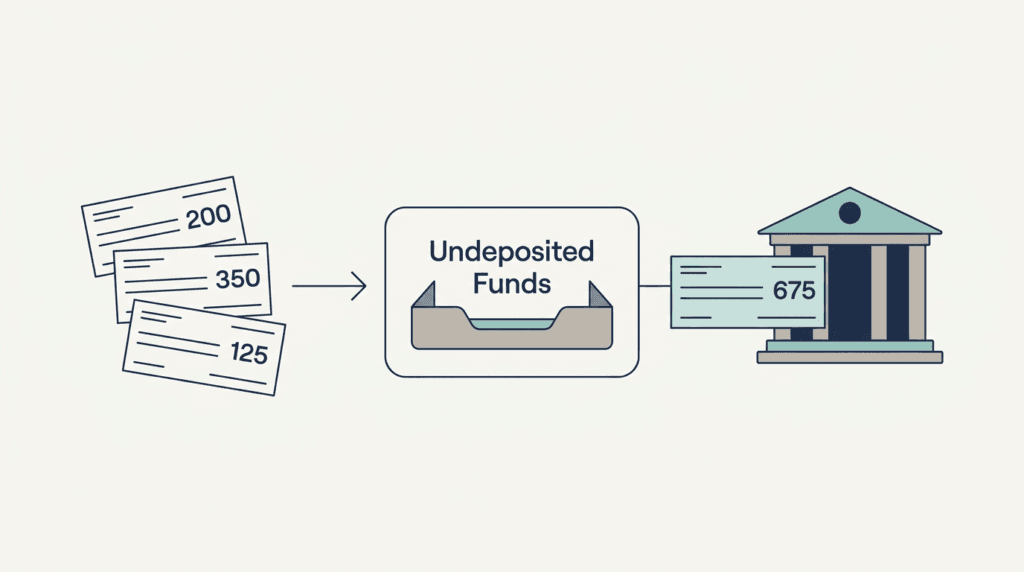
Imagine three customers pay you three cheques on Monday: 200, 350 and 125. On Tuesday you walk into the bank and deposit all three together. Your bank statement will show one line: 675.
Your books, though, recorded three separate payments. If each payment went straight to the bank account, your books would show three lines and the bank would show one, and they would never match.
Undeposited Funds fixes that. Each payment lands in the holding account first. Then you record one deposit that takes all three out and puts 675 into the bank. Now your books and the bank agree.
So the account is doing its job when money passes through it. It is only a problem when money goes in and never comes out.
Why the balance builds up
In almost every file, the cause is one of five things.
1. Payments received but never deposited. Someone recorded the customer payment and stopped there. The second step, the deposit, was never made. This is the most common cause by a wide margin.
2. The deposit was entered as a separate transaction. The bank feed showed 675 arriving, and somebody categorised it straight to income. Now the income is counted twice: once from the invoice and once from the deposit. Meanwhile the original payment is still sitting in the holding account.
3. Payment processor fees were ignored. Stripe, Square or PayPal takes 675 in sales and sends 654.42 to the bank. If the deposit is recorded as 654.42 without a line for the 20.58 fee, the amounts never match and the difference stays stuck.
4. Old opening balances. The file was converted from another system and the holding account came over with a balance already in it.
5. Duplicate payments. The same customer payment was entered twice, once by the bookkeeper and once by the bank feed.
How to clean up undeposited funds in QuickBooks, step by step
Work in this order. Skipping ahead is what causes people to break months that were already closed.
Step 1: Get the list, not the total
Run a report on the Undeposited Funds account for all dates. Do not look at the balance sheet number alone. You need the individual transactions, with the date, the customer name and the amount. Intuit's own help page on the Undeposited Funds account covers where that report lives in each version.
Every method of how to clean up undeposited funds in QuickBooks starts here, because you cannot match a total, only individual lines. Export it to a spreadsheet. You are going to be sorting and ticking things off, and that is painful inside accounting software.
Step 2: Sort by date, oldest first
The oldest items are almost always a different problem from the newest. Anything older than the last closed financial year usually needs a write-off or an adjusting entry, not a deposit. Anything from the last few months is usually a genuine deposit that was never recorded.
Draw a line at the end of your last closed year. Deal with everything below that line first and leave the old items alone until the end.
Step 3: Match the recent items to real bank deposits
Open your bank statement for the same period next to your list.
For each deposit on the statement, find the payment or group of payments in your list that add up to it. Tick them off. This is the whole job, and it is mostly arithmetic. Three cheques of 200, 350 and 125 against a bank line of 675 is a match.
When you find a match, record the deposit in QuickBooks selecting exactly those payments, and date it the day the bank shows the money arriving. Not the day the customer paid. The deposit date must be the bank date, or your reconciliation will not clear.
Step 4: Handle the processor fees
If the bank line is 654.42 and your payments add up to 675, the difference is the fee. Add a negative line to the deposit for 20.58 and code it to bank charges or merchant fees.
Do not change the customer payment amount to 654.42. The customer paid 675. The fee is your expense, and your profit and loss should show it.
Step 5: Find the double-counted deposits
Now look for items that are still unmatched because the deposit is already in the bank account, just recorded the wrong way.
Search the bank account for the amount. If you find a deposit coded straight to income or sales, you have the duplicate. Delete that transaction and re-record it properly as a deposit from the holding account. Your income total should go down by that amount, which is correct, because it was being counted twice.
This is the single most valuable step in how to clean up undeposited funds in QuickBooks, and it often reveals why a client's profit looked better than their bank balance. If unpaid invoices are part of that same gap, the pending payments tracker is the other half of the picture.
Step 6: Deal with the old leftovers
Whatever is left is genuinely old and genuinely unmatched. Options, in order of preference:
- The payment was never actually received. The invoice should still be open. Delete the payment and let the invoice go back to unpaid.
- The money was received in cash and never banked. Record a deposit to the owner's drawings account.
- Nobody can establish what it was. Write it off with a journal entry to a clearly labelled account, and write a one-line note explaining the decision.
Never silently delete old items in a closed period. If the period is closed, use a dated journal entry so the audit trail survives.
Step 7: Stop it happening again
A clean account stays clean only if the workflow changes.
If the business is paid mostly by card or transfer, with money arriving one payment at a time, turn the holding account off in the payment settings and let payments go straight to the bank account. The account only earns its keep when several payments are banked together.
If the business does bank cheques in batches, keep it, but add one rule: the deposit gets recorded the same day the payments are entered. Not later. A simple invoice log kept alongside the books makes that habit easy to hold.
What good looks like when the cleanup is done
You will know how to clean up undeposited funds in QuickBooks has worked when all four of these are true at the same time.
- The Undeposited Funds balance is zero, or it holds only payments received in the last few days that have genuinely not reached the bank yet.
- Every bank deposit has a matching group of customer payments behind it.
- The reconciliation for each month clears with no unexplained difference.
- Income on the profit and loss has gone down if duplicates were found, and the owner knows why.
That last point matters. If you are doing this for a client, tell them before they see the report. A profit figure that drops after a cleanup looks alarming unless somebody explains that the earlier figure was wrong.
How long it takes
There is no fixed answer to how to clean up undeposited funds in QuickBooks in terms of hours, because the work scales with the number of stuck items, not the size of the business. For a small service business with a year of mess, a few hours. For a file with several years, multiple payment processors and no reconciliations ever completed, this is a multi-day job and should be priced as one.
The honest signal is the number of items in the list. Under thirty, it is an afternoon. Over three hundred, it is a project, and it almost certainly comes with uncleared bank reconciliations and an unexplained opening balance equity figure attached to it.
Does this work the same in QuickBooks Online and Desktop?
The accounting is identical. The menus are not. In QuickBooks Online the holding account is cleared through Bank Deposit, and the setting that bypasses it sits inside the payment preferences. In Desktop the same job runs through Record Deposits, and the account can be switched off per payment method. Either way, how to clean up undeposited funds in QuickBooks means the same three moves: list the stuck items, group them to match real bank lines, record one deposit per bank line.
If you would rather not do it
This is the exact work I do for small service businesses and the accountants who look after them: take the exported file, clear the holding account, match every deposit, reconcile the months, and hand back a short list of the items I could not resolve without you. Fixed scope, fixed price, no access to your logins needed.
If your Undeposited Funds balance has a number in it that nobody can explain, that is the whole job, and it is a finite one. Done once and done properly, how to clean up undeposited funds in QuickBooks is not a task you repeat every month.