
Somebody before you tried to fix it. On the balance sheet sat a line called Opening Balance Equity — so they pushed it into Undeposited Funds to make it disappear. Now every bank deposit shows a mystery amount mixed in with the customer checks.
This is a real story from a real QuickBooks forum, and it happens more often than anyone admits. Opening Balance Equity is not complicated — but almost everyone meets it at the worst possible moment: while cleaning up years of messy books. Here is exactly what the account is, why it will not go to zero, and the journal entry that finally fixes it.
Key takeaways
- Opening balance equity is a temporary staging account — the software creates it automatically to keep your first entries balanced.
- In finished books, OBE should always read $0.00. A leftover balance means the setup was never completed.
- The fix is one journal entry: Debit Opening Balance Equity / Credit Owner’s Equity (or Retained Earnings for a corporation).
- Most non-zero balances come from unfinished setup, duplicate opening entries, or deleted accounts.
What is opening balance equity?
Opening balance equity (OBE) is a temporary account that accounting software creates on its own to keep the balance sheet balanced when you enter starting numbers. It is not an account you are supposed to use daily. It is a parking spot.
Why the software needs it: bookkeeping runs on one iron rule — Assets = Liabilities + Equity. Every debit needs a matching credit. When you add a bank account with a $12,400 opening balance but do not say where that money came from, QuickBooks cannot guess. It credits Opening Balance Equity for the difference so the equation still holds, and waits for you to explain later.
“Later” is where the problems start.
Why is my opening balance equity not zero?
A non-zero OBE almost always comes from one of these five places:
- Opening balances entered without an offset. Bank, credit card, loan, or inventory starting values went in — but nobody pointed the other side to Owner’s Equity or Retained Earnings.
- Journal entries dumped into OBE. A previous bookkeeper used it as a hiding place for numbers they could not explain — including pushing OBE into Undeposited Funds, which just moves the mess.
- Reconciliation done wrong. Uncleared checks and wrong adjustment amounts during a bank reconciliation get routed to OBE.
- Deleted or renamed accounts. When an account disappears mid-year, the software drops its leftover balance back into OBE.
- Daily transactions coded to OBE. Deposits, bills, or expenses that belong in income or expense accounts.
Why a leftover balance actually hurts you
OBE is supposed to exist for a day, not a decade. A sitting balance means your equity section is wrong: the business’s real net worth is hidden inside a junk account. Banks, investors, and your CPA read the balance sheet from top to bottom — and a permanent Opening Balance Equity line tells them the books were never finished.
How to clear opening balance equity to zero: 5 steps
Step 1: Run the detail report
Reports → search “Transaction Detail by Account” → set the account to Opening Balance Equity and the date range to All Dates. This is your worklist: every entry that ever landed in OBE.
Step 2: Identify what each entry really was
For every line, ask one question: where did this money actually come from? Owner’s own cash? Profit kept in the business from earlier years? An asset with a starting value? A loan? The answer decides the fix. If a line is a customer payment that was dumped here (or into Undeposited Funds), it belongs in income — see how to clean up undeposited funds in QuickBooks for that exact rescue.
Step 3: Move the money to permanent accounts
Two destinations, depending on your business:
- Sole proprietor: Owner’s Equity (or Owner’s Capital)
- Corporation: Retained Earnings — and ask your CPA before touching retained earnings
Step 4: Make one clean journal entry
If OBE shows a positive (credit) balance:
- Debit Opening Balance Equity — the full remaining balance
- Credit Owner’s Equity / Retained Earnings — the same amount
If OBE shows a negative (debit) balance, reverse both sides. Add a memo like “Closing out Opening Balance Equity to Owner’s Equity” so the next person understands the entry in five seconds.
Step 5: Prove it is zero
Run the detail report again. The balance must read 0.00, and the money must be visible in the correct equity line. Then run your Profit and Loss and Balance Sheet side by side — if anything looks off afterwards, the same habits in how to clean up uncategorized expenses in QuickBooks apply here too.
Opening balance equity vs retained earnings
They sit in the same section of the balance sheet, but they do different jobs. Opening balance equity is a temporary account the software builds to absorb your first setup entries. Retained earnings is permanent: it is the profit the business has kept since day one, after paying out dividends or draws. The cleanup moves money from the temporary account into the permanent one — and once that is done, OBE never fills up again.
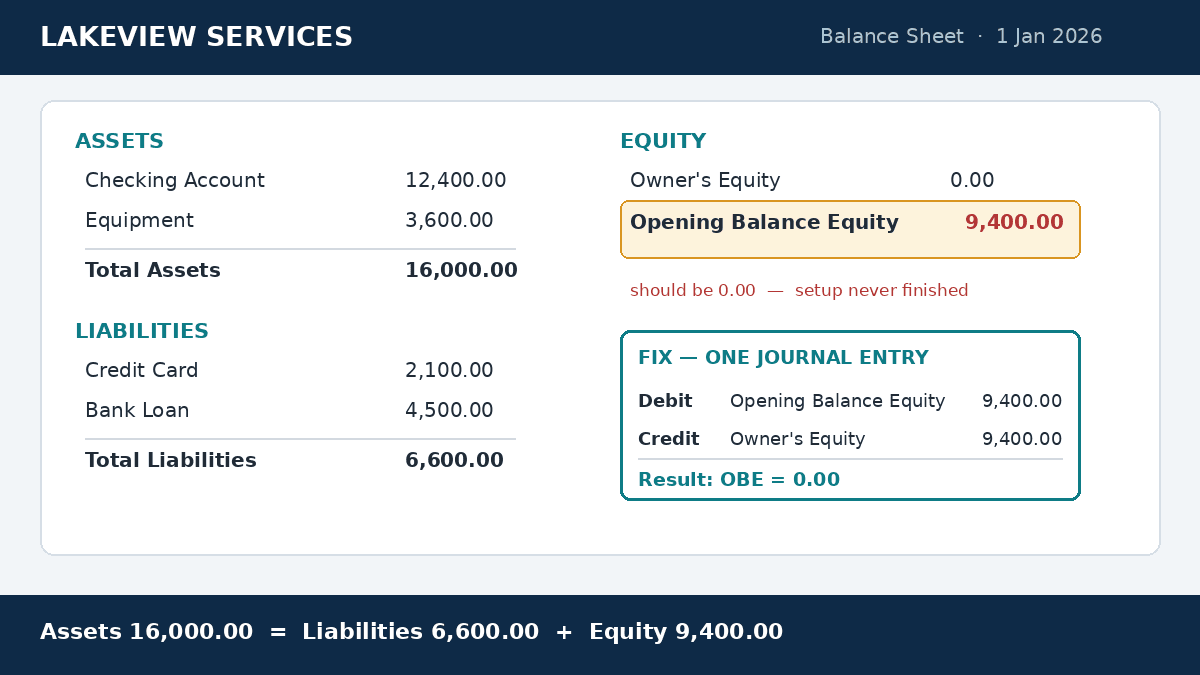
Worked example: from $9,400 to $0.00
A service business starts using new software on January 1. It enters these opening balances:
- Checking account: $12,400
- Equipment: $3,600
- Credit card: $2,100 (owed)
- Bank loan: $4,500 (owed)
Assets = $12,400 + $3,600 = $16,000. Liabilities = $2,100 + $4,500 = $6,600. The owner’s real equity = $16,000 − $6,600 = $9,400. Because none of the entries carried an offset, OBE now holds that $9,400.
The fix is one journal entry: Debit Opening Balance Equity $9,400 / Credit Owner’s Equity $9,400. Done. OBE reads 0.00, and the balance sheet finally tells the truth.
Keep it at zero: three habits
- Never code daily transactions to OBE. If you do not know where a line belongs, use Uncategorized Expense or Undeposited Funds as a short stop — and clear those monthly.
- Set opening balances properly. When you add an account with a starting value, point the other side to the right equity account from day one.
- Check it monthly. One minute: open the balance sheet, confirm OBE = 0.00. The same 15-minute review that keeps your monthly profit and loss clean will catch this instantly.
Frequently asked questions
Should opening balance equity be zero?
Yes. Always. OBE exists only while you are setting up the file. If it shows a number after setup is finished, an entry is unexplained and your equity section is wrong.
Why is my opening balance equity negative?
A negative (debit) balance usually means debits and credits were reversed somewhere, or a transaction was coded to OBE that belongs in an asset, liability, or expense account. Run the all-dates report and fix each line at the root before making the closing entry.
How to solve opening balance problems?
Fix the cause first — duplicate opening entries, deleted accounts, bad reconciliation adjustments — then make a journal entry for whatever legitimately remains. Never force a plug entry over a balance you do not understand.
How do you fix an opening balance in Xero?
The logic is identical: Xero also needs both sides of every entry. Set the opening balance on the account with the correct date, put the other side in Owner’s Equity or Retained Earnings, and reconcile from there. The 5-step cleanup in this guide works the same way.
The one-minute answer
Opening balance equity is a temporary parking account the software uses to balance your first entries. It should exist only during setup, and it should read $0.00 the rest of your life. If it does not, run the all-dates report, move every entry to Owner’s Equity or Retained Earnings with one journal entry, and never let daily transactions land there again.
If the report is bigger than your patience, send me a message — cleaning OBE accounts is exactly the kind of fixed-scope job I do every week.