
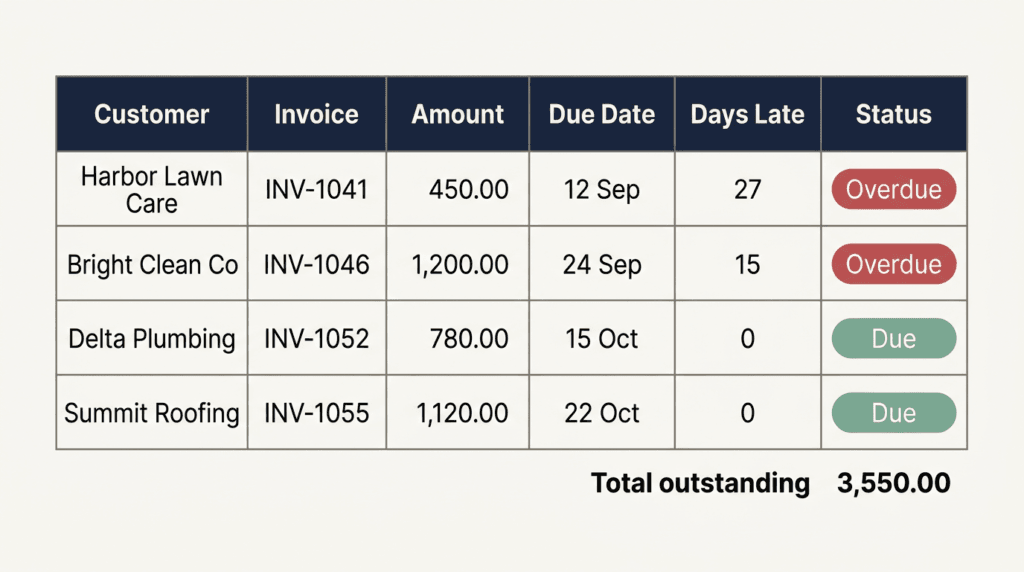
You can track pending payments in Excel with six columns and two formulas. Most small firms know their total outstanding to the rupee. Very few can name, without opening three files, the single customer who has owed them the most money for the longest time. That gap is the whole problem. If you want to track pending payments in Excel properly, the sheet does not need to be clever — it needs to end every week with one name and one phone number.
Everything below is one tab. You can track pending payments in Excel or in Google Sheets with the same formulas. This is the sheet I keep. Six columns, two formulas, one sort. It works the same in Excel and in Google Sheets, and it takes about twenty minutes to build the first time.
Table of Contents
ToggleWhat this guide covers
- Why a sheet beats an aged receivables report
- The six columns
- The two formulas
- The sort that makes a call list
- Where it connects
- The free template
Why you should track pending payments in Excel, not in a report
Accounting software already produces an aged receivables report. It is accurate and almost nobody acts on it. The reason is that it is a report: it describes a state, then closes. A tracker is different. It carries the one field no accounting report has — what happened the last time you asked. Without that field you re-start every conversation from zero, and the customer learns that nothing follows a reminder.
So the sheet below is deliberately not a ledger. It will not balance. It exists to answer three questions on a Saturday morning: who owes, for how long, and who did I already chase.
The six columns
| Column | Header | What goes in |
|---|---|---|
| A | Customer | One row per customer, not per invoice. Merge their dues. |
| B | Amount outstanding | Total unpaid across all their orders. |
| C | Oldest unpaid date | The date of their oldest unpaid order, not the newest. |
| D | Days outstanding | Formula. Leave empty. |
| E | Last contacted | The date you last actually asked. Blank if never. |
| F | Next step | Short text: Call Monday. Email sent, waiting. Written off. |
One row per customer is the decision that makes this sheet usable. Per-invoice rows give you forty lines and no clarity; per-customer rows give you twelve lines and a call list. If a customer genuinely needs invoice-level detail, keep that in the invoice log and let this sheet stay a summary.
The two formulas
In D2, days outstanding:
=IF(C2="","",TODAY()-C2)
Drag it down. Format column D as a plain number, not a date, using Excel number formatting — Excel will otherwise show you 1/1/1900 and you will think the sheet is broken.
In G2, an optional flag that does the thinking for you:
=IF(D2="","",IF(D2>60,"ESCALATE",IF(D2>30,"CHASE","")))
Thirty and sixty are not sacred numbers; UK guidance on late commercial payments uses thirty days as the default statutory point. If your trade settles in a week, use seven and twenty-one. The point is that the sheet, not your memory, decides who has crossed a line.
One colour rule
Select A2:G50, then Conditional Formatting, New Rule, Use a formula. Enter:
=$G2="ESCALATE"
Fill light red. Add a second rule for =$G2="CHASE" in light amber if you want, but stop there. Three colours is a dashboard; five colours is wallpaper, and wallpaper gets ignored within a fortnight.
The sort that turns the sheet into a call list
This is the step that makes the whole thing work. Every time you open it: select the data, sort by column D, largest to smallest. Row 2 is now the person you ring today. Not the biggest debtor — the oldest one. Old debt goes bad faster than large debt, and the customer who has been quiet for ninety days is the one drifting towards never paying at all.
If two rows tie on days, break the tie with column B. Oldest first, largest second. That ordering has recovered more money for me than any reminder template.
What column E actually does
Last contacted is the column everyone skips and the column that does the work. It converts chasing from a mood into a cadence. A reasonable rhythm for a small firm:
- Days 1–30: nothing. Invoices are not late yet and early chasing reads as distrust.
- Day 31: a short email. One line, the amount, the invoice date, no apology.
- Day 45: a phone call. Not an email. Email is where debt goes to sleep.
- Day 60: a written note naming a date by which you need it, and what happens after.
- Day 90: stop supplying, or decide it is a bad debt and write it off in your own head.
Fill E every single time, even when the call went nowhere. A row that says Called 14 Oct, promised Friday is worth more next week than a row that says nothing.
Worked example
Suppose today is 20 October. A customer has an unpaid order dated 1 September, total 1,750, and you emailed them on 5 October.
- C = 01/09, so D returns 49.
- 49 is above 30 and below 60, so G returns CHASE and the row turns amber.
- E says 05/10, which is fifteen days ago — the email has had its chance.
- F should therefore read Call, do not email again.
The sheet has made the decision. You only execute it.
Where it connects
This tracker is the collection half of a pair. The order half — what you promised, whether you delivered, what is still unpaid — lives in the sales order tracker, and column B here should simply equal the pending amount there. If the two disagree, trust the order tracker and correct this one; it is the sheet closer to the actual transaction.
Once both exist, the monthly view becomes cheap to produce: the monthly profit and loss tab reads the value columns and tells you whether a good month was actually a paid month. Many are not.
The free template to track pending payments in Excel
Build it yourself from the table above — it is twenty minutes and you will understand every cell, which matters more than speed. If you would rather have it built on your own debtor list, with the ageing bands set to your trade and the old rows imported, message me from the contact page.
The mistake that kills these sheets
Not abandonment. Dishonesty. The row that says Called, waiting for six consecutive weeks is worse than an empty sheet, because it lets you feel that the money is in motion when nothing has happened. If you did not chase, leave E blank. A blank cell is uncomfortable, and that discomfort is the only enforcement mechanism a one-person business has.